How to buy and add an eSIM for your iPhone and iOS device
KnowRoaming app guide
Buy an eSIM using the KnowRoaming app
- While you have a stable internet connection, download KnowRoaming’s App from the App Store.
- Log In using your KnowRoaming account details or Sign Up with KnowRoaming and follow the Sign Up instructions until your account is verified and you are logged in.
- Before purchasing an eSIM, ensure your device is eSIM compatible. Click here for a comprehensive list of eSIM compatible iPhones. Or test it yourself by dialling *#06#. Your IMEI number/s should appear. If it does, your phone is likely eSIM compatible.
- Choose your destination by typing your destination into the search function, alternatively select a region or country from the ones listed.
- Select the plan that best aligns with your estimated data usage and trip duration (the most popular plan is the 5 GB one). If you need more data later, you can always top up your plan then.
- Once you have selected your plan, proceed to payment. If you have a discount or promo code, please apply it in the Voucher Code section and click apply.
- After a successful payment, you will be sent to the “My plans” page. It is now time to set up your eSIM. We suggest setting this up with a stable internet connection, before you travel. Your plan will only come into effect when you arrive at your destination.
When to add your eSIM
To ensure a smooth setup process,we recommend adding your eSIM just before your departure, as setup requires a stable Internet connection.
However, if you prefer, you can wait until you arrive in your destination country to activate your eSIM using Wi-Fi.
If you added your eSIM in your home country, you can turn the eSIM off until you reach your destination country.
Activation of the package only occurs when you use your eSIM in the country / region where it is eligible for connection.
Add your eSIM using the KnowRoaming app
- Open the KnowRoaming App. And login.
- Click on “My plans.”
- Choose the eSIM you want to add, it should say “eSIM Not Added.”
- Click on the “Add eSIM” button.
- Follow the prompts and click “Allow.”
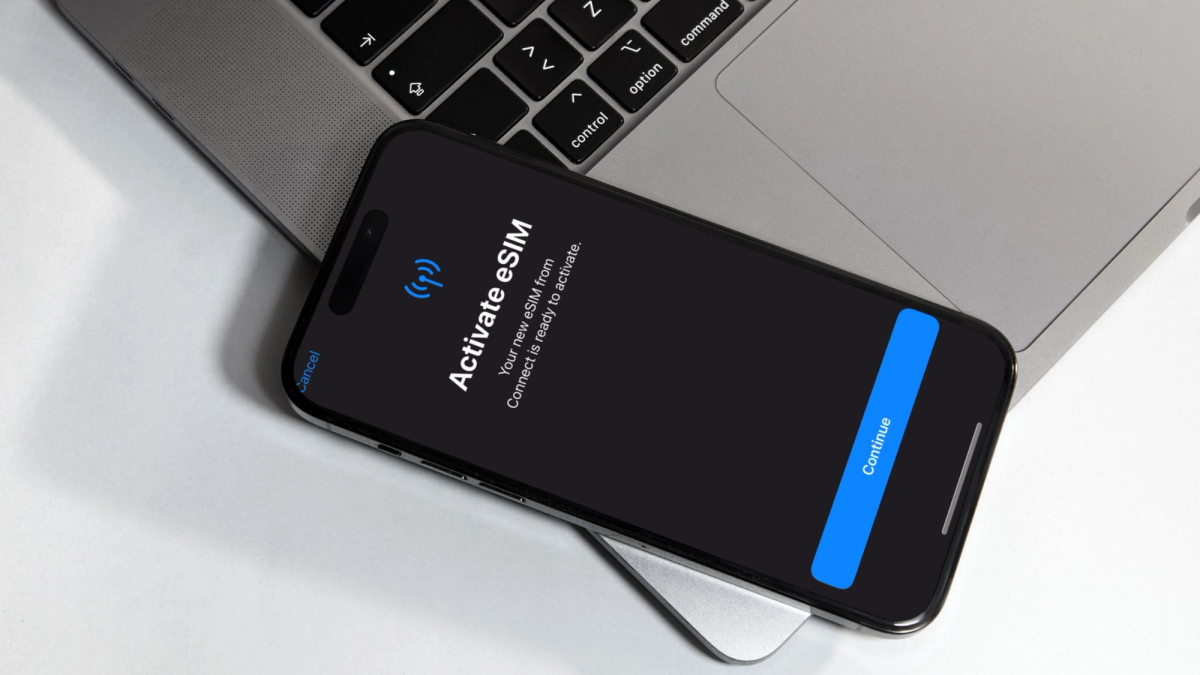
- When the eSIM is ready to activate, click “Continue.”
- Setup may take up to 2 minutes.
- Your eSIM is now added.
Activate your eSIM
Once within an eligible country for your eSIM package, switch Mobile Data to your eSIM.
- Go to Settings and select Mobile Data (in some regions it is called Cellular).
- On the Mobile Data screen, tap on the Mobile Data option and select your eSIM as your preferred line.
- Go back to Mobile Data settings. Tap on your eSIM, under your SIM list. Turn Data Roaming on.
When you return from your trip
- Go to Settings and tap on Mobile Data (or Cellular).
- Tap on Mobile Data at the top of your screen.
- Select your Primary Home SIM.
- Go back to Settings. And click on Mobile Data (or Cellular) again.
- Tap on your eSIM.
- Toggle Off “Turn On This Line”.
KnowRoaming website guide
Buy an eSIM using the KnowRoaming website
- While you have a stable internet connection, go to www.KnowRoaming.com
- Log In using your KnowRoaming account details or Sign Up with KnowRoaming and follow the Sign Up instructions until your account is verified and you are logged in.
- Before purchasing an eSIM, ensure your device is eSIM compatible. Click here for a comprehensive list of eSIM compatible iPhones. Or test it yourself by dialling *#06#. Your IMEI number/s should appear. If it does, your phone is likely eSIM compatible.
- Choose your destination by typing your destination into the search function, alternatively select a region or country from the ones listed.
- Select the package that best aligns with your estimated data usage and trip duration (the most popular package is the 5 GB one). If you need more data later, you can always top up your package then.
- Once you have selected your package, proceed to payment. If you have a discount or promo code, please apply it in the Voucher Code section and click apply. You will notice.
- After a successful payment, you will receive a QR code. It is now time to set up your eSIM. We suggest setting this up with a stable internet connection, before you travel. Your package will only come into effect when you arrive at your destination.
When to add your eSIM
To ensure a smooth setup process,we recommend adding your eSIM just before your departure, as setup requires a stable Internet connection.
However, if you prefer, you can wait until you arrive in your destination country to activate your eSIM using Wi-Fi.
If you added your eSIM in your home country, you can turn the eSIM off until you reach your destination country.
Activation of the package only occurs when you use your eSIM in the country / region where it is eligible for connection
Add your eSIM using the KnowRoaming website
- With a stable Internet connection, scan the QR code provided to you on the checkout page or confirmation email you received.
- Setup may take up to 2 minutes.
- Tap on Mobile Plan.
- Accept and continue all prompts.
Activate your eSIM
Once within an eligible country for your eSIM package, switch Mobile Data to your eSIM.
- Go to Settings and select Mobile Data (in some regions it is called Cellular).
- On the Mobile Data screen, tap on the Mobile Data option and select your eSIM as your preferred line.
- Go back to Mobile Data settings. Tap on your eSIM, under your SIM list. Turn Data Roaming on.
When you return from your trip
- Go to Settings and tap on Mobile Data (or Cellular).
- Tap on Mobile Data at the top of your screen.
- Select your Primary Home SIM.
- Go back to Settings. And click on Mobile Data (or Cellular) again.
- Tap on your eSIM.
- Toggle Off “Turn On This Line”.
Perguntas Frequentes
Instala a tua eSIM no teu telemóvel compatível com eSIM e desbloqueado antes de viajares. Quando chegares a um país com cobertura, ativa a tua eSIM e o roaming de dados, e o teu plano começa quando te ligas.
Sim. Aliás, recomendamos que o faças.
Usa a app da KnowRoaming para comprar um plano, e ela instala a tua eSIM em poucos toques. Alguns telemóveis podem precisar de uma instalação manual com um código QR, e a nossa equipa de apoio e os nossos guias de instalação estão disponíveis 24/7.
Sim. Instala a tua eSIM antes de viajares para te ligares assim que aterrares. A app da KnowRoaming instala-a por ti, ou podes usar o código QR para uma instalação manual.
Podes comprar a tua eSIM mesmo antes de partires, ou quando chegares ao destino. Só precisas de uma ligação à internet estável.
Se eliminares o perfil da eSIM do teu telemóvel, ele deixa de se poder ligar à rede com esse plano, embora o plano em si não seja cancelado. Para a recuperares, lê de novo o código QR que recebeste com a compra da eSIM, ou instala-a outra vez a partir da app da KnowRoaming.