Best eSIM for Australia: Stay Connected From Sydney to the Outback
Last Updated: August 14, 2026
4.5


Planning a trip to Australia? Whether you are road-tripping along the Great Ocean Road, exploring the reef in Queensland, or landing in Sydney for a quick business trip, reliable mobile data is not optional. It is essential.
KnowRoaming is one of the top-rated travel eSIM providers for Australia, recognised by PCMag, TechRadar, and The Points Guy. In this guide, we cover everything you need to know: how eSIMs work in Australia, which plan is right for your trip, and how to set up before you fly.
Does eSIM Work in Australia?
Yes. eSIMs work across Australia on all major local networks. Australia has excellent 4G LTE coverage in cities and coastal areas, with connectivity extending into most regional towns. Remote areas like the Outback and some national parks have limited coverage regardless of which provider you use, but for the vast majority of your trip, an eSIM will keep you well connected.
KnowRoaming's Australia eSIM connects to local networks automatically when you land, so you are online the moment you clear customs, no SIM card required.
Why KnowRoaming Is the Best eSIM for Australia
Not all travel eSIMs are equal. Here is what makes KnowRoaming stand out for Australia travel:
Trusted by Travelers Worldwide
KnowRoaming is rated highly across independent review platforms including Trustpilot and Reviews.io, and has been reviewed and recommended by major tech publications including PCMag, TechRadar, The Points Guy, and News24. When you are on the other side of the world, using an eSIM provider with a proven track record matters.
Instant Setup: No Airport SIM Hunting
Install your KnowRoaming eSIM through the app (available on IOS and Android) before you leave home. When you land in Australia, it activates automatically and connects you to the local network. No queues, no kiosks, no asking airport staff for help in a different time zone.
No Roaming Fees, Ever
International roaming in Australia with your home carrier can cost several dollars per MB. KnowRoaming gives you a fixed data plan at a set price. You know exactly what you are spending before you even board the plane.
Keep Your Home Number
KnowRoaming's eSIM provides data while your home SIM stays active for calls and texts. You do not need to give out a temporary Australian number — friends, family, and your bank can still reach you as normal.
Coverage Across 200+ Destinations
Australia is often one stop on a bigger adventure. KnowRoaming covers 200+ destinations worldwide, so whether you are adding New Zealand, Southeast Asia, or anywhere else to your trip, you are covered. Regional plans that include both Australia and New Zealand include Oceania, Asia, and Global.
24/7 Support Wherever You Are
If anything goes wrong, whether that is a connection issue, an activation question, or a plan upgrade, KnowRoaming's support team is available 24/7 via the support centre or WhatsApp. That matters when you are in a different time zone and need help fast.
KnowRoaming eSIM Plans for Australia
KnowRoaming offers flexible data packages ranging from 1 GB to 100 GB, so you can choose exactly what you need for your trip length and usage style.
Australia-only plans: If you are visiting Australia without plans to cross into New Zealand or other countries, a local Australia plan is the most cost-effective option.
Regional plans: Traveling beyond Australia? Regional plans cover both Australia and New Zealand, ideal for the classic Sydney-Auckland-Queenstown route. Options include Oceania and Asia plans.
Global plan: If Australia is one leg of a world trip, the Global eSIM covers 130+ destinations on a single plan, no switching, no multiple purchases.
Running low on data mid-trip? Top up directly through the KnowRoaming app without interrupting your connection.
How Much Data Do You Need for Australia?
Australia is a large country, and how you travel directly affects how much data you use:
Light use (messaging, occasional maps, emails): 1–3 GB for a one to two week trip, assuming Wi-Fi is available at your accommodation.
Moderate use (social media, Google Maps, video calls): 3–5 GB for a week to ten days of regular use in cities and along the coast.
Heavy use (road trips, remote areas, working remotely, hotspot sharing): 5–10 GB or more. If you are driving between cities, camping in national parks, or spending time away from resort Wi-Fi, you will want a larger plan. Australia's distances are vast and offline maps help, but real-time navigation eats data fast.
Tip: If you are doing a long road trip (Sydney to Melbourne, Darwin to Uluru, Perth to Margaret River), download offline map sections before you leave populated areas. Mobile coverage drops significantly outside major towns.
The airport SIM looks cheaper. The math says otherwise.
Optus and Telstra both sell tourist SIMs at Australian airports, typically AU$30 to AU$40 for 30 to 40 GB. That sounds like a solid deal, until you factor in what the price tag doesn't show: airport kiosk pricing runs 40 to 60% higher than the same SIM bought at a supermarket in the city, you need a passport to register it, and it only starts working once you've found the kiosk, queued, and activated it, all after a long-haul flight.
KnowRoaming's 20 GB, 30-day Australia plan is US $27.50, which works out to a higher per-GB rate on paper than a well-priced local SIM. What that number leaves out is everything the airport SIM costs you in time and certainty: no queue, no passport handed to a kiosk clerk, and a connection that's already live before you land, not after you've cleared customs and found the right counter. For shorter trips, the 5 GB, 15-day plan (US $9.50) or the 3 GB, 10-day plan ($7.00) both work out cheaper in total than most airport tourist SIMs, and for a road trip with unpredictable, heavy use, the unlimited plans (from $16.75 for 5 days up to $59.75 for 30 days) remove the per-GB question entirely.

Mobile Coverage in Australia: What Travelers Need to Know
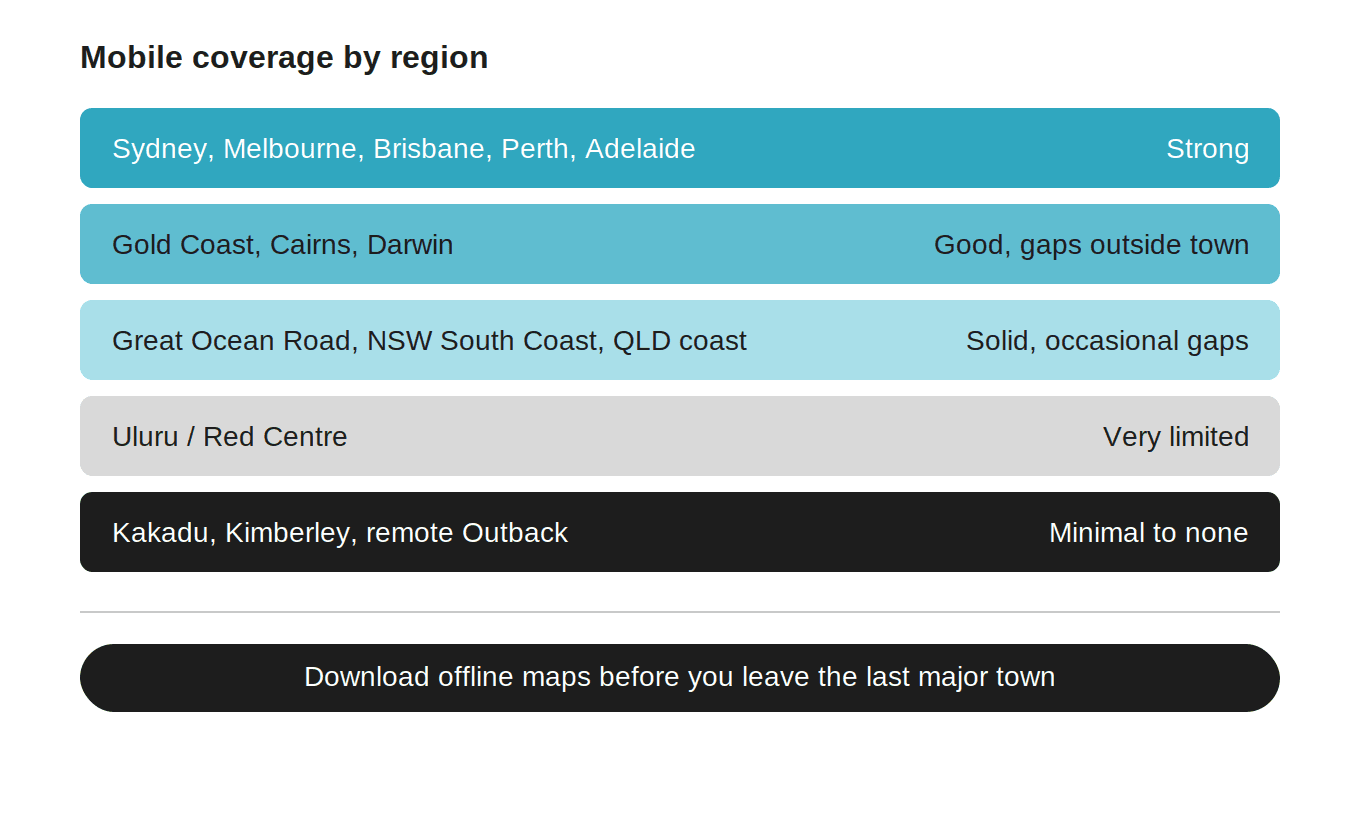
Australia has excellent urban coverage but significant gaps in remote areas. Here is what to expect by region:
Sydney, Melbourne, Brisbane, Perth, Adelaide: Strong 4G LTE throughout the city and suburbs. Fast, reliable data for all activities.
Gold Coast, Cairns, Darwin: Good coverage in the city and major tourist areas. Some drop-off heading into rainforest or remote coastal areas.
Great Ocean Road, NSW South Coast, Queensland coast: Generally solid coverage, with occasional gaps in more remote stretches.
Uluru / Red Centre: Very limited coverage. Wi-Fi at lodges is usually available, but do not count on mobile data in this region. Download everything you need before you go.
Kakadu, Kimberley, and remote Outback areas: Minimal to no coverage. Plan for offline navigation and download maps, guides, and entertainment before you leave the last major town.
Tip: Australia is one of the world's largest countries by area. If you are road-tripping beyond major highways, treat mobile data as a useful tool where available, not a guaranteed connection everywhere.
What "coverage drops outside major towns" actually looks like
Sydney to Melbourne is 880 km, about 9 hours on the Hume Highway, and stays inside strong 4G coverage nearly the whole way, so this is the low-risk end of an Australian road trip.
Darwin to Uluru is a different story: roughly 1,960 km, 20 to 21 hours of driving, usually spread across 5 to 6 days through Litchfield, Katherine, and Alice Springs. Long stretches of this route, especially through Kakadu and the Red Centre, have patchy to no coverage. The towns along the way (Katherine, Tennant Creek, Alice Springs) are where you reconnect, not the highway between them.
Perth to Margaret River is 270 km, about 3 hours, on well-covered roads the whole way. This is the easy end of the spectrum too, closer to a weekend wine trip than an outback crossing.
The distance alone doesn't tell you which category a route falls into. Whether you're near a highway with steady traffic or a remote stretch with one roadhouse every few hundred kilometres does.
What happens when you lose signal
Drive into Kakadu, or deep into the Red Centre toward Uluru, and at some point your bars will simply disappear. Not slow, not throttled: gone. This isn't a KnowRoaming problem or an Optus problem, it's geography. Australia is enormous and much of it has no towers at all.
What actually matters in that moment isn't which SIM is in your phone. It's whether you downloaded your offline maps before you left the last town with signal. Google Maps and Maps.me both let you save an area in advance, and in places like Kakadu or the Uluru approach, that saved map is doing the work your data plan can't reach to do. Your eSIM picks back up the moment you're back in range, in Alice Springs, Yulara, or the next roadhouse. Until then, offline maps are the actual safety net, not the SIM.
Road-trip data budget table
| Route | Distance | Drive time | Typical trip length | Coverage along the way | Realistic data need |
|---|---|---|---|---|---|
| Sydney to Melbourne | 880 km | ~9 hours | 1 to 2 days | Strong nearly the whole way | 1 to 2 GB |
| Darwin to Uluru | ~1,960 km | ~20 to 21 hours | 5 to 6 days | Patchy to none for long stretches, strong in towns | 3 to 5 GB |
| Perth to Margaret River | 270 km | ~3 hours | Day trip to a weekend | Solid the whole way | 1 to 2 GB |
The Darwin to Uluru number looks low for six days on the road, and that's the point: most of the driving hours have no signal to use data on in the first place, so the real cost is downloading offline maps before Darwin, then normal use kicks back in each evening in town.
How to Get Your KnowRoaming eSIM for Australia
Setup takes under 10 minutes:
- Download the KnowRoaming app, available on iOS and Android
- Choose your plan: select a local Australia plan, or a regional/global plan if your trip covers more ground
- Install your eSIM: follow the in-app steps; no QR code scanning required
- Enable roaming on your eSIM line: go to your phone's mobile data settings and switch data roaming on for the KnowRoaming eSIM line only
- Land in Australia and connect: your eSIM activates automatically and connects to the local network
Before you travel: Confirm your device is eSIM-compatible and unlocked. Check the full list of compatible devices here. Most iPhones from XS onwards and most Android flagships from 2020 support eSIM.
Tips for Using Your eSIM in Australia
Set KnowRoaming as your default data line. On iPhone: Settings > Mobile Data > select your KnowRoaming eSIM. On Android: Settings > Network > SIM management. This ensures all data goes through your eSIM plan, not your home carrier.
Keep data roaming off on your home SIM. This prevents accidental roaming charges from your main carrier. Your home SIM will still ring for calls and texts.
Download offline maps before leaving cities. Google Maps or Maps.me lets you save offline map areas. Essential for road trips, national parks, and anywhere you know coverage may be limited.
Invest in a larger plan for road trips. If you are driving long distances, especially in Queensland, WA, or the Northern Territory, having plenty of data on board is worth it. Service stations and roadhouses may have Wi-Fi, but it is often slow and unreliable.
WhatsApp works great in Australia. Most travelers and short-term visitors use WhatsApp for coordination. Your eSIM data plan keeps you reachable on WhatsApp without needing an Australian number.
What Travelers Say About KnowRoaming
KnowRoaming is rated by real travelers on Trustpilot and Reviews.io. Here is what travelers who used KnowRoaming in Australia are saying:
Karen (Reviews.io) "I have used KnowRoaming in Australia, New Zealand, UK and Italy and it's been simple to use, no problems at all."
Chris Green (Trustpilot, 5 stars) "Easy to use, easy to install, great coverage and bandwidth while I was travelling in Australia, sometimes I was getting better coverage than the locals! Couldn't recommend it more strongly, and I saved a lot of money."
Anonymous (Reviews.io, 3GB Australia eSIM) "I arrived in Australia, switched data to my eSIM and I was connected within seconds. Was so helpful to be able to call my Uber and let my family know I had arrived safely."
Deborah (Reviews.io) "Very good eSIM. I have been using it for over a month here in Australia."
Shafakkat (Reviews.io) "Easy to install. No issues during our stay in New Zealand and Australia. I recommend it."
DR (Reviews.io) "So far I have used KnowRoaming in several European countries, the UK, South Africa, Australia and Indonesia. It has never failed me and is incredibly easy to top up. This is my preferred best value eSIM."
Independent reviews from leading tech publications also back KnowRoaming:
- PCMag named KnowRoaming among the best eSIM providers for international travelers
- TechRadar gave KnowRoaming a strong review for its coverage and ease of use
- The Points Guy highlighted KnowRoaming as a top pick for travel connectivity
- News24 tested KnowRoaming on a remote island trip and reported strong performance even in challenging conditions
These are not paid placements. They are independent editorial assessments from trusted publications. That is the kind of track record that matters when you are relying on connectivity 15,000 km from home.
Who this isn't for
If your trip is a week in Sydney and Melbourne, staying in hotels with Wi-Fi and using data mainly for maps between meetings or dinners, you don't need a large plan. A 1 to 3 GB plan covers that comfortably, and paying for more is money spent on a scenario you won't hit. Save the bigger plans for the road trips, the remote coastline, and the multi-day drives where the data actually gets used.

Frequently Asked Questions
Does eSIM work in Australia? Yes. eSIMs work across Australia on major local networks. KnowRoaming's Australia eSIM activates automatically when you land and connects you to the strongest available network.
What is the best eSIM for Australia? KnowRoaming is one of the top-rated travel eSIMs for Australia, recommended by PCMag, TechRadar, and The Points Guy. It offers flexible data plans, instant setup via app, no roaming fees, and 24/7 support.
Do I need an eSIM for Australia? You do not need one, but it is by far the most convenient and cost-effective way to get mobile data in Australia. The alternative, international roaming with your home carrier, is significantly more expensive, and buying a physical SIM on arrival means queuing at the airport.
How do I get an eSIM for Australia? Download the KnowRoaming app, choose your Australia plan, install the eSIM through the app, and enable data roaming on that line. Your eSIM activates automatically when you land. Full instructions are available in the KnowRoaming knowledge hub.
Can I use my KnowRoaming eSIM in both Australia and New Zealand? Yes. Regional plans that cover both countries include Oceania, Asia, and Global. No swapping SIMs between countries.
How much data do I need for Australia? For a typical 7–10 day trip: 1–3 GB for light use, 3–5 GB for moderate use (maps, social, calls), 5 GB+ for road trips or remote travel. KnowRoaming offers plans from 1 GB to 100 GB, and you can top up anytime through the app.
What devices are compatible with KnowRoaming's eSIM? Most iPhones from the XS onwards and Android flagships from 2020 support eSIM. Check the full compatibility list here.
What if I run out of data in Australia? Top up instantly through the KnowRoaming app. See the top-up guide here.
Is there customer support if something goes wrong? Yes. KnowRoaming offers 24/7 customer support via the support centre and WhatsApp.
Ready to Get Connected in Australia?
KnowRoaming is the smart, simple choice for Australia travel, trusted by travelers worldwide, reviewed by leading tech publications, and available in minutes from your phone.
Browse Australia eSIM plans on KnowRoaming and get set up before your flight.