How To Check If My Phone Is eSIM Compatible?
Last Updated: February 2, 2026
4.5

How To Check If My Phone Is eSIM Compatible?
eSIM technology is transforming mobile connectivity, especially for travellers, but many people still ask the same questions: how to check if my phone is eSIM compatible, is my phone eSIM compatible, and how do I tell if my phone supports eSIM?
Before purchasing an eSIM, it is essential to confirm whether a device supports eSIM technology. While many modern smartphones do, some older models and region-specific devices may not. Knowing how to check compatibility helps avoid installation issues and ensures seamless connectivity.
KnowRoaming offers eSIMs for over 200 destinations worldwide, making it easy to choose an eSIM for international travel and stay connected across borders.
To make things even simpler, KnowRoaming provides a built-in eSIM compatibility checker on both the website and in the app, so you can quickly confirm whether your device supports eSIM before purchasing.
What Does eSIM Compatible Mean?
An eSIM compatible device is a smartphone or tablet that supports embedded SIM technology. Instead of inserting a physical SIM card, a digital SIM profile can be downloaded and activated directly on the device.
For travellers, this means faster activation, fewer SIM swaps, and easier connectivity. Global coverage is available through KnowRoaming’s Global eSIM, while regional plans such as the Europe eSIM provide multi-country coverage.
How to Check if My Phone Is eSIM Compatible?
There are several ways to answer the question: how to check if my phone is eSIM compatible, or does my phone get eSIM.
1. Use the KnowRoaming Compatibility Checker
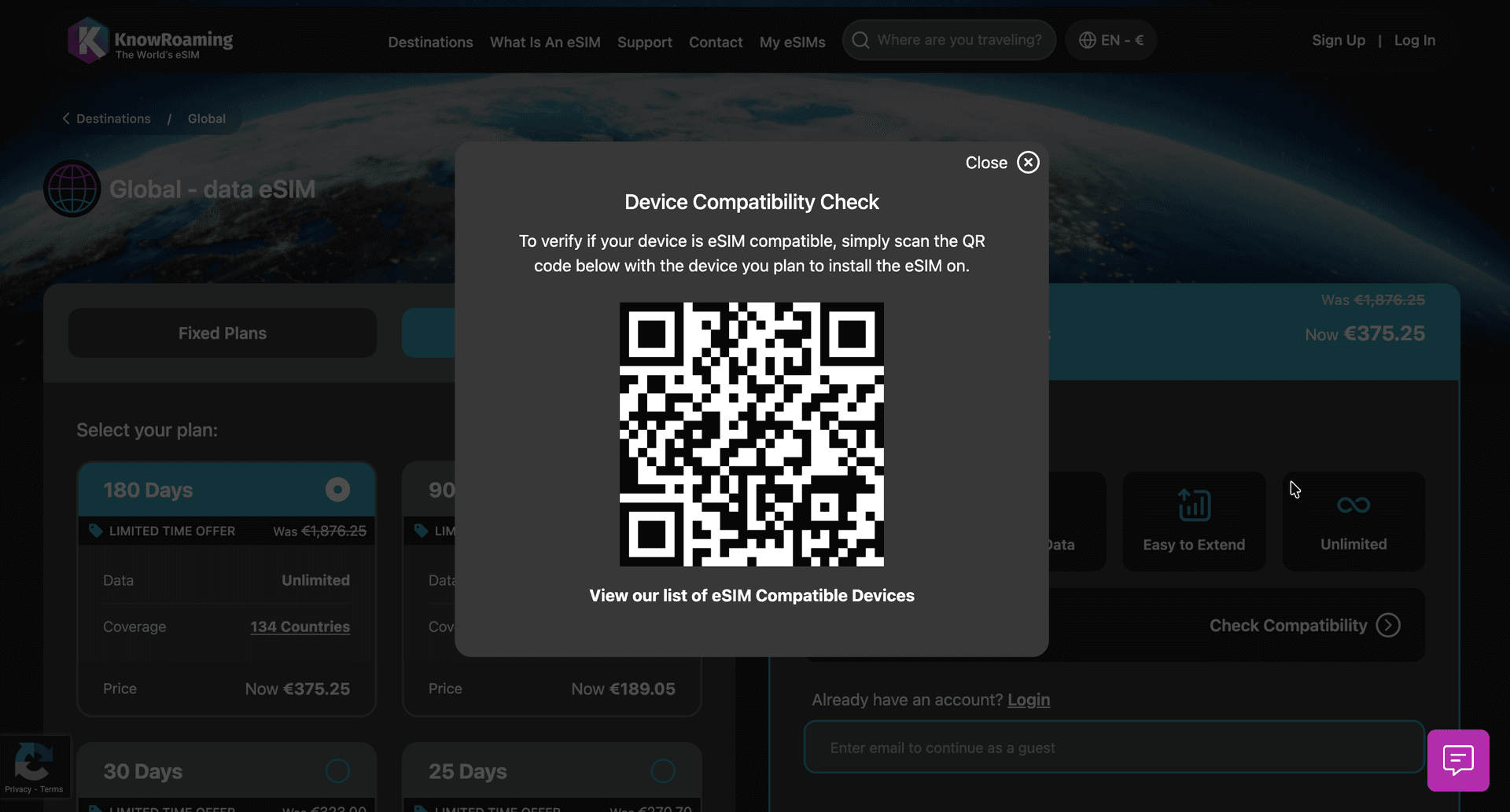
The simplest way to check if a device supports eSIM is by using the compatibility checker available on KnowRoaming product pages and in the app. By selecting “Is my phone compatible?”, the device is automatically analysed for eSIM support.
If viewing on the web:
- Go to any product page, like our Global plan
- Click "Check Compatibility" in the Is my device eSIM Compatible section.
- Scan the QR Code with your phone
- We will tell you if your phone is eSIM compatible
If viewing on the mobile:
- Go to any product page, like our Global plan
- Click "Check Compatibility" in the Is my device eSIM Compatible section.
- We will tell you if your phone is eSIM compatible
2. Check Phone Settings on iPhone
Many people ask, has my phone an eSIM or does my phone get eSIM?
Most iPhones from iPhone XS, XR, and newer models support eSIM.
To check on iPhone:
- Open Settings
- Select Mobile Data or Cellular
- Look for the option “Add eSIM”
If this option appears, the device supports eSIM technology.
Detailed setup instructions are available in the guide on how to buy and install an eSIM on iPhone.
3. Check Phone Settings on Android
Android users often ask, how do I tell if my phone supports eSIM?
Many newer Android devices, including Samsung Galaxy and Google Pixel models, support eSIM.
To check on Android:
- Open Settings
- Select Connections or Network
- Look for “Add eSIM” or “SIM Manager”
If an eSIM option is available, the device is compatible.
Step-by-step instructions are available in the guide on how to buy and install an eSIM on Android.
Do All Smartphones Accept eSIM?
A common question is whether all smartphones accept eSIM.
The answer is no. Not all smartphones support eSIM technology.
eSIM support is typically available on:
- Most flagship smartphones released after 2018
- Many mid-range smartphones released in recent years
- Some tablets and smartwatches
However, older devices, budget models, and certain regional versions may not support eSIM. Compatibility should always be checked before purchasing an eSIM.
Is an eSIM Better Than a SIM?
Another frequent question is whether an eSIM is better than a SIM card.
Yes, for most travellers, an eSIM is more convenient than a physical SIM. Key advantages include:
- Instant activation without visiting a store
- No need to swap SIM cards
- Ability to manage multiple plans on one device
- Seamless connectivity across multiple countries
The benefits of eSIM technology are explained in more detail in the benefits of eSIM guide.
What Is the Disadvantage of eSIM?
While eSIM technology offers many benefits, there are also some disadvantages.
The main disadvantages of eSIM include:
- Not all devices support eSIM
- Some carriers do not support eSIM in certain regions
- Transferring an eSIM to a new device can require reinstallation
Despite these limitations, eSIMs remain a practical option for international travel, especially when using reliable providers with global coverage and strong support.
Support resources are available through KnowRoaming support and 24/7 WhatsApp assistance.
eSIM for International Travel
eSIMs are increasingly popular for international travel because they eliminate the need for physical SIM cards and reduce roaming costs.
With an eSIM, data can be activated before departure or immediately upon arrival. This makes eSIMs a flexible solution for frequent travellers and digital nomads.
KnowRoaming provides reliable global coverage, making it one of the best eSIM options for international travel. Real user experiences and comparisons can be explored in the KnowRoaming reviews and comparisons guide, as well as independent platforms such as Reviews.io and Trustpilot.
The KnowRoaming app is available on iOS and Android, making it easy to install, manage, and monitor eSIM plans.
The Best eSIM For International Travel: KnowRoaming
Understanding how to check if a phone is eSIM compatible is the first step to using an eSIM successfully. By checking compatibility through device settings, official device lists, or built-in tools, it is possible to confirm whether a device supports eSIM technology in minutes.
With global coverage, flexible plans, and comprehensive support, eSIMs are becoming the preferred choice for travellers looking for a simple and reliable way to stay connected abroad.
KnowRoaming continues to be one of the best eSIM solutions for international travel, offering coverage in over 200 destinations worldwide.
